Piere: Budget, Plan, Save
- 4.5
- Rating
- 50.00K
- Installs
- Free
- Price

 Analysis by App-foxy
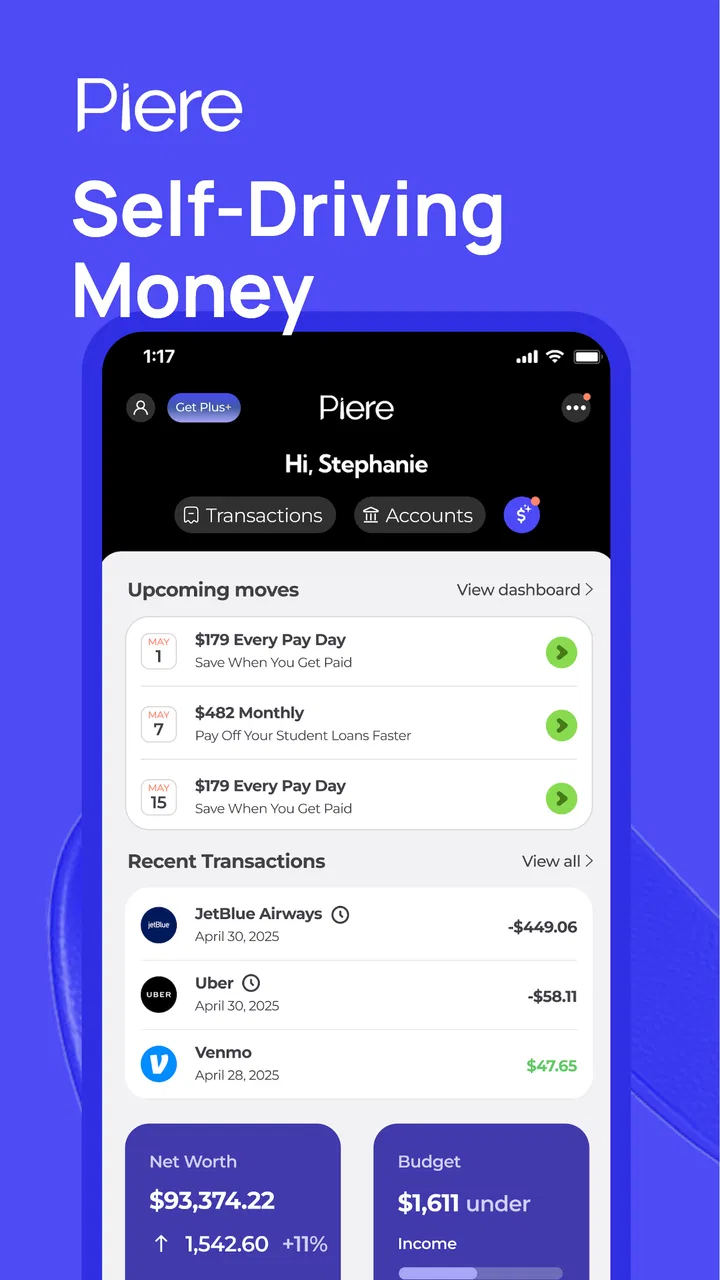
Managing money often fails for a simple reason: the information is scattered. A bank balance sits in one place, upcoming bills in another, and savings goals remain vague until the end of the month. I tested Piere: Budget, Plan, Save as a finance app built around bringing those decisions into a more organized routine. Its focus is not just recording yesterday’s spending; it is helping me decide what money should do next.
That makes it interesting for people who want a budget without turning personal finance into a second job. The app is free to install, is suitable for everyone, and comes from UniversTech. It has reached over 50 thousand installs and holds a 4.5 average from hundreds of ratings, which suggests that the basic approach is connecting with a meaningful group of users. I would still judge it by fit rather than popularity, because a budgeting app is only useful when its method matches the way you actually handle money.
What I looked for before trusting it with a budget
My first decision criterion was effort. A budgeting tool can contain impressive options and still be a poor choice if every purchase requires too much manual work. Piere’s appeal is the promise of a more automatic routine: create a plan, keep an eye on spending, and direct savings with less repeated administration. For someone who has abandoned spreadsheets after a few weeks, that emphasis matters more than an elaborate collection of charts.
You May Also Like

 Blood Strike: 2.5 Anniversary
Blood Strike’s Loadouts Turn Every Drop Into a Tactical Gamble
A close look at Blood Strike’s custom loadouts: how fast access to signature weapons reshapes its battle royale rhythm, rewards preparation, and narrows the gap between fights.

 Pandora - Music & Podcasts
Pandora’s Music Is Easy to Start, but Harder to Recover
Pandora’s strength is its low-effort path from a seed to a station. Its weak spot is how much confidence it asks you to place in connection, setup, and quiet recovery.

 8 Ball Pool
 Is Built on Rivalries, Rematches, and Routine
A close look at the rivalries, rematches, shared routines, and unanswered safety questions that turn a quick pool match into a persistent mobile community.

 Samsung Music
’s Quiet Strength Is Playing What You Already Own
Its reach comes less from spectacle than from dependable access to a personal library. That simplicity is both the app’s strongest retention engine and its ceiling.

 AccuWeather: Weather Radar
AccuWeather Review: A Quick, Clear Forecast for Everyday Decisions
For everyday plans, the best forecast is the one you can understand quickly. AccuWeather makes rain timing, radar, and local conditions easy to act on, with a few trade-offs.

 Hill Climb Racing
Why Hill Climb Racing Still Turns Crashes Into One More Run
A tiny car, a bumpy hill and one more upgrade: Hill Climb Racing keeps resurfacing because its simple chaos makes every near-miss feel personal.
More From Our News Desk



The second criterion was clarity. I wanted to know whether the app could help answer practical questions: Can I afford an unplanned expense? Which commitments are making this month tight? Am I saving intentionally or simply hoping that something remains in the account? A useful finance app should turn those questions into actions rather than merely displaying a balance.
The third was flexibility. A budget should reflect real life, including irregular income, annual renewals, shared household costs, and months when priorities change. Automation is helpful only when I can understand and adjust it. If an automatic rule makes a decision that I cannot easily review, the convenience becomes a new source of anxiety.
I also considered the cost of commitment. Piere is free to begin, but optional in-app purchases range from $1.99 to $79.99 per item. That does not automatically make it expensive, yet it means I would inspect which functions remain comfortable without paying and whether any paid option genuinely saves enough time to justify its price. The right question is not “Is it free?” but “What will my normal workflow cost?”
The app is currently at version 6.2.2 and requires at least operating system version 10. That is useful to know before planning a household rollout across older phones. It was released on April 8, 2024, so I see it as a relatively recent tool rather than a long-established personal finance institution. I would therefore start with observation and small goals before making it the only place where I monitor important money decisions.
How I would set it up for a normal month
I would begin with the smallest useful picture rather than trying to classify every historical transaction. First, I would establish the money that must be protected: housing, utilities, debt payments, food, transport, and any other unavoidable commitments. Then I would separate flexible spending from goals. This prevents a common mistake in budgeting apps, where an attractive savings target quietly competes with a bill that has a fixed deadline.
Next, I would create a short list of savings purposes instead of one large, vague “savings” bucket. A near-term repair fund, a yearly expense, and a longer-term reserve require different levels of urgency. Even if the app makes automation easy, I would review each goal after the first full pay cycle. The first month is when unrealistic assumptions become visible.
A particularly useful workflow is to treat automated saving as a suggestion that deserves a weekly check, not as permission to stop thinking. If a grocery bill rises or a subscription renews, the amount available for saving changes. A plan that adapts to those facts is helpful; one that encourages me to ignore them is not. I would keep a small buffer outside the goal calculations so that one surprise does not force me to undo the whole plan.
For couples or families, I would also agree on the meaning of each category before connecting the app to everyday decisions. “Food,” for example, might include groceries for one person but restaurant meals for another. The technical setup is only half the work. Shared definitions prevent arguments that look like app problems but are really planning problems.
Where Piere feels strongest
The strongest part of this app is its orientation toward forward planning. Many ordinary banking apps are excellent at showing what has already happened, but they leave the user to interpret that history. Piere is more compelling when I want to turn spending information into a plan for the rest of the month. That shift from reporting to decision-making is the reason I would recommend trying it.
It is also a good match for people who need a visible connection between budgets and savings. Saving often fails when it is treated as whatever happens to be left over. By giving savings a deliberate place in the plan, the app encourages me to decide first rather than negotiate with myself at the end. That is a small behavioral change, but it can be more valuable than another colorful spending breakdown.
Another strength is the potential reduction in repetitive maintenance. I would not want to spend an evening copying transactions into a spreadsheet just to discover that the result is already out of date. An automated approach can make regular check-ins realistic, especially for users who have several accounts or a busy schedule. The benefit is greatest when the app presents the information in a way that supports a quick decision instead of demanding constant categorization.
In an everyday scenario, imagine that my salary arrives near the start of the month and three large bills follow shortly afterward. I could use the app to protect those obligations first, set a manageable savings amount, and leave a defined portion for flexible spending. Midway through the month, an unexpected pharmacy purchase appears. Rather than abandoning the budget, I would reduce a less urgent goal or trim discretionary spending while keeping essential commitments intact. That is the kind of adjustment a planning-focused tool can make easier.
The most useful habit is not checking the app constantly; it is making a short, deliberate review before money becomes difficult to move. I would use that review to ask three questions: what changed, what must be protected, and which goal can wait? This keeps automation in its proper role. It handles routine structure, while I remain responsible for exceptions and priorities.
Small practices that make the approach work better
One non-obvious tip is to avoid setting the maximum possible savings amount at the beginning. A smaller amount that survives an ordinary month teaches me more than an ambitious target that must be reversed. After observing a few cycles, I can increase the goal with evidence rather than optimism.
A second is to distinguish timing problems from spending problems. A budget may look healthy overall but still feel impossible because several payments arrive together. I would review the calendar of obligations and keep enough accessible money for those concentrated periods. This is where a forward-looking plan can be more helpful than a simple monthly total.
A third is to use irregular expenses as a test of the system. Annual renewals, school costs, travel, and maintenance are not true surprises if they recur. I would create a plan for them early and treat each contribution as part of the normal monthly cost. This makes the budget more honest and reduces the temptation to label predictable expenses as emergencies.
I would also resist the urge to create too many categories. Detailed labels can feel productive, but they may turn a simple review into bookkeeping. I prefer categories that lead to a decision: essential, flexible, future, and shared. If a category does not change what I do with the money, it may not deserve extra attention.
Where a different type of tool may fit better
Piere is not automatically the best choice for everyone. If I only need to check balances and recent transactions, my bank’s own app may be faster and more familiar. Adding a separate budgeting layer can feel unnecessary when my financial life is simple and I already review it consistently.
A traditional spreadsheet may suit someone who wants complete control over formulas, custom categories, and offline records. It takes more effort, but that effort can be worthwhile for a user who enjoys building a personal system and does not want an automated workflow. In that case, Piere’s convenience may feel less important than the freedom to design every detail.
Envelope-style budgeting tools can be a better fit for people who think in strict spending limits. Their central idea is to assign available money to categories and stop when a category is empty. Piere’s planning and savings orientation may appeal more to someone who wants an overall financial direction, while an envelope method may be clearer for someone whose main challenge is controlling day-to-day spending.
People with complicated business finances, multiple currencies, unusual reimbursement arrangements, or detailed accounting requirements should be cautious. A personal finance planner is not the same as professional bookkeeping software. I would not choose it as the sole record for tax-sensitive work or a business operation without first proving that its organization matches those needs.
There is also a privacy and trust decision whenever I use a finance app rather than a bank’s own tools. I would read the app’s current connection and account-handling explanations carefully before linking anything, then begin with a limited setup if possible. The convenience of a consolidated view has to be weighed against how comfortable I am placing that information inside another service.
The real cost of changing my routine
Switching to a new budgeting app is not just an installation decision. The bigger cost is learning its vocabulary, correcting early assumptions, and deciding which goals deserve attention. I would not migrate every old record immediately. Instead, I would start from the current month, keep my existing statements available, and compare the app’s picture with them during the first review.
That gradual approach also answers an important practical question: what happens if the plan feels wrong? I would pause or revise the least urgent goal before touching essential bills. A budgeting system should make correction normal, not make me feel that changing a target means failure. The first version of a budget is a draft based on guesses; the second is usually better because it includes real behavior.
For the optional purchases, I would wait until the free experience shows a clear limitation in my own routine. Paying for a feature that I rarely use is poor value, even if it sounds useful in principle. On the other hand, an upgrade can be reasonable if it removes a repeated task that was previously causing me to abandon budgeting. I would judge that after consistent use, not during the initial excitement of setup.
The age rating of Everyone makes the app broadly approachable, but suitability is still personal. A teenager learning basic planning may need guidance from a parent or guardian, while an adult managing debt or shared bills may need a more detailed conversation about priorities. The rating tells me who can use it; it does not decide whether the planning method is mature enough for a particular financial situation.
My recommendation after weighing the trade-offs
I recommend Piere to someone who wants a practical bridge between spending awareness and intentional saving. It is especially promising for users who have tried manual budgets, lost momentum, and want a more automated way to keep a plan visible. The combination of budgeting and savings goals gives it a clearer purpose than a finance app that only reports transactions.
I would skip it if I want a completely manual ledger, highly specialized accounting, or a rigid envelope system above everything else. I would also avoid making it my only source of truth until I had checked that its view of my finances matched my statements and that its planning style worked through an ordinary month.
My suggested trial is simple: begin with essential commitments, one realistic savings goal, and a weekly review. Do not attempt to fix every financial habit at once. After a month, ask whether the app helped me make better decisions with less effort, or merely gave me another dashboard to maintain. That answer is more important than any feature list.
For me, the deciding advantage is its emphasis on what happens next. UniversTech has positioned this free finance app as a planning companion rather than just a record of past spending, and that is where it earns attention. With sensible goals, a buffer for surprises, and a willingness to adjust the automation, Piere: Budget, Plan, Save can become a useful part of a personal money routine. It is not a replacement for judgment, but for the right user, it can make that judgment easier to apply consistently.
FAQs for Piere: Budget, Plan, Save
01What is Piere: Budget, Plan, Save, and who is it designed for?
Piere: Budget, Plan, Save is a personal finance app designed to help users organize their money in one place. It can be useful for people who want to monitor spending, create a budget, track financial goals, and understand their overall financial position. The app is especially appealing if you prefer an automated overview instead of manually updating separate spreadsheets or notes.
02How does Piere connect to my bank and financial accounts?
Piere generally works by connecting supported bank, credit card, investment, or other financial accounts through a secure account-linking service. After authorization, transactions and balances can be imported into the app for categorization and budgeting. Before downloading, check whether your financial institutions are supported in your country and review the permissions requested, since availability and connection reliability may vary.
03Is Piere: Budget, Plan, Save free to use?
The app may offer free access to core budgeting features, while some advanced tools, account limits, or planning functions can require a subscription or in-app purchase. Pricing and included features may change over time, so it is important to check the current App Store or Google Play listing before signing up. Also review trial terms, renewal dates, and cancellation instructions.
04Is my financial information safe when using Piere?
Because Piere handles sensitive financial information, security and privacy should be considered before connecting accounts. The app may use encrypted connections and third-party financial data providers, but no online service can guarantee absolute protection. Read the privacy policy, understand whether credentials are shared directly with the app or a connection provider, and enable device security such as a passcode or biometric lock.
05Can Piere help me create a realistic budget and save money?
Piere can help you review income, recurring bills, spending categories, and financial goals so you can make a more informed budget. Its value depends on accurate account connections and properly categorized transactions, so occasional corrections may be necessary. The app can highlight patterns and support saving plans, but it does not replace personal judgment or professional financial advice.
Pros
- Simple budgeting tools make it easy to track spending and plan ahead.
- Savings goals help turn larger financial targets into manageable steps.
- Clean interface keeps key financial information easy to find.
- Useful reminders can encourage consistent saving and bill planning.
- Suitable for users who want a straightforward personal finance overview.
Cons
- Some advanced budgeting features may require a paid subscription.
- Manual transaction entry can become time-consuming for frequent purchases.
- Limited customization may not suit complex household budgets.
- Financial insights depend on accurate and consistent user input.
- Users may want more detailed reports and spending category controls.

Piere: Budget, Plan, Save
Gallery